
The CRM that works with JobBOSS to grow your business
SalesV2 uses the data already in your JobBOSS to grow sales: it finds new customers that look like your best ones, brings back the customers who went quiet, answers every RFQ the hour it lands and chases every quote until it becomes a PO. Works with JobBOSS cloud, on-premises and JobBOSS². Nothing sends without you.
See a live JobBOSS integrated demo.
Connect your JobBOSS. We run Find new customers on your own book.
A twenty-minute call, a read-only connection, and one play: the tool finds companies like your best customers, the people to write to, and drafts the note. It parks on your desk. Nothing reaches anyone until you approve it.
- JobBOSS cloud or on-premises, connected in a day.
- You see the list and the note before anything is sent.
- Read-only on your ERP. We never write to JobBOSS.
A Houston spring maker
- PO awards go to its vendors within the hour, 23 vendors, since September 14.
- The pick list reaches the stockroom every working morning at 6:00, since September 9.
- Open quotes are chased to PO every weekday afternoon, since July.
A Texas weld and fabrication shop
- Every RFQ email is filed, assigned and acknowledged under its own rules, since the summer.
- The owner approves the quote follow-ups from his phone; the tool sends them.
Names withheld at the shops' request. Every fact above is a live automation on the date shown; ask on the call and we will show you the send log.
What SalesV2 does with the data already in your JobBOSS
JobBOSS knows the customers you have. SalesV2 turns that into the next ones.
Finds new customers
Companies that look like your best ones, with the people to write to, added to your list.
Brings back quiet customers
The accounts that stopped ordering, with the note drafted and parked for your approval.
Answers RFQs, chases quotes
Every RFQ acknowledged the hour it lands. Every quote followed up until it becomes a PO.
Live in under a day
Connect your JobBOSS, cloud or on-premises, and the plays start on your own data.
From RFQ Email to Shipped Order — Tracked End to End
No other CRM shows you this. Every inquiry, every quote, every order — connected and visible in one timeline.
RFQ Email
Auto-captured from Outlook
Classify & Assign
RFQ, Task, or Archive — one click
Quote in JobBOSS
Auto-synced with line items & PDF
Order & Delivery
WIP → Completed → Shipped
Every Status, at a Glance
Your work queue shows real-time badges so you always know where every inquiry stands — no clicking around, no asking colleagues.
New email pulled from Outlook
An RFQ or inquiry just arrived. Nobody has looked at it yet. It sits in your work queue until someone classifies it.
Example: "RFQ — 500 pcs aluminum bracket, need quote by Friday"
Owned by an estimator
Someone classified this as an RFQ and assigned it to a team member. The scope (Machining, Fabrication, etc.) has been set.
Example: Assigned to Mike → Scope: CNC Machining
Quoted — order in progress
A live quote number from JobBOSS. "Open" means the order has been placed and your shop floor is working on it right now (WIP).
Example: 200 pcs stainless housing — $28,000 — on the floor
Quoted — order completed
Quote number with no "Open" suffix means the order has shipped. This is a fully closed loop — RFQ email to delivered parts.
Example: 100 pcs titanium brackets — shipped & invoiced
Quote expired — follow up!
The quote passed its expiration date without converting to an order. This is money left on the table — one click to re-engage the customer.
Example: One shop found 6 expired quotes worth $150K+ in week one
Email classified as a task
Not every email is an RFQ. Customer questions, follow-ups, and internal requests get classified as tasks and assigned to the right person.
Example: "Can you guys do anodizing?" → Task for engineering
RFQ declined by team
Your team decided not to quote this one — wrong fit, capacity issue, or outside scope. Admins can review declined RFQs in the Approvals queue.
Example: "Outside our tolerance range" → Declined → Admin reviews
Removed from active queue
Spam, duplicates, or resolved items are archived to keep your work queue clean. Still searchable if you need to find them later.
Example: Duplicate RFQ from auto-forward → Archived
What Can You Do From the Work Queue?
Every record type has context-aware actions. No generic forms — just the options that make sense for that stage.
New Email — Classify It
- RFQ — Assign for Quoting → Pick an estimator, set the scope
- Task — Create a Task → Route non-RFQ emails to the right person
- Archive → Clear spam, duplicates, or irrelevant messages
Plus: View Conversation, View Attachments
Assigned RFQ — Work It
Auto-paired: When your estimator creates a quote in JobBOSS, SalesV2 automatically links it to this RFQ email — no manual work needed.
- Assign Quoter → Reassign to a different estimator
- Create RFQ Task → Schedule a follow-up or internal action
- Convert to Task → Reclassify if it's not actually an RFQ
- Decline → Not quoting this one (goes to admin review)
Plus: Email, View Conversation, View Attachments, View History
Task Email — Handle It
- Create Task → Assign to a team member with a due date
- Convert to RFQ → Reclassify if it turns out to be a quote request
- Convert to Opportunity → Track it as a sales opportunity
- Mark Complete → Done — close it out
- Archive → No longer needed
Plus: Email, View Conversation, View Attachments, View History
Quoted — Track It
- Assign Quoter → Change ownership if needed
- View Quote PDF → The actual PDF from JobBOSS
- Archive → Move out of active queue
Plus: Email, View Conversation, View Attachments, View History
Declined — Admin Review
- Archive → Confirm the decline and remove from queue
Plus: View History — appears in Approvals queue for admin oversight
Always Available
These actions are available on every email record, regardless of status:
- Email → Send an email to the contact directly
- View Conversation → Full email thread in context
- View Attachments → PDFs, drawings, specs — all inline
- View History → Full audit trail of every action taken
Your Shop's Problems. Solved.
Every job shop running JobBOSS faces the same three gaps. SalesV2 closes all of them.
RFQs buried in email
Requests arrive in shared inboxes, get forwarded around, and nobody knows who's handling what. 10-15% disappear.
"Did we quote that?"
Someone quotes it in JobBOSS, but the sales team has no visibility. Follow-ups fall through the cracks. Quotes expire silently.
CRMs don't get manufacturing
Generic CRMs need months of customization, expensive consultants, and still don't talk to your ERP.
Sales in a box. More sales without adding people.
A sales process is what you are supposed to do. A play is what actually happens.
We built our process, TIPS, into plays. Every stage has its plays. You call them, we run them, you approve.
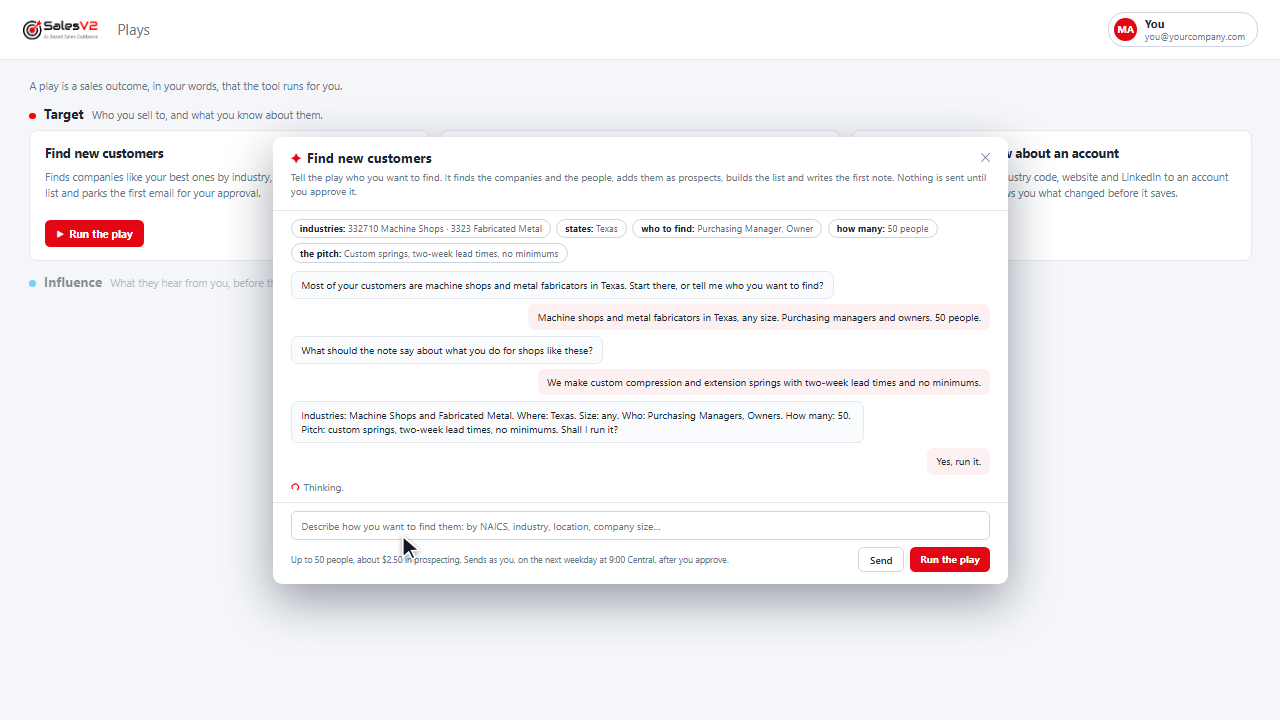
Finds companies like your best ones by industry, finds the people, builds the list and parks the first email for your approval.
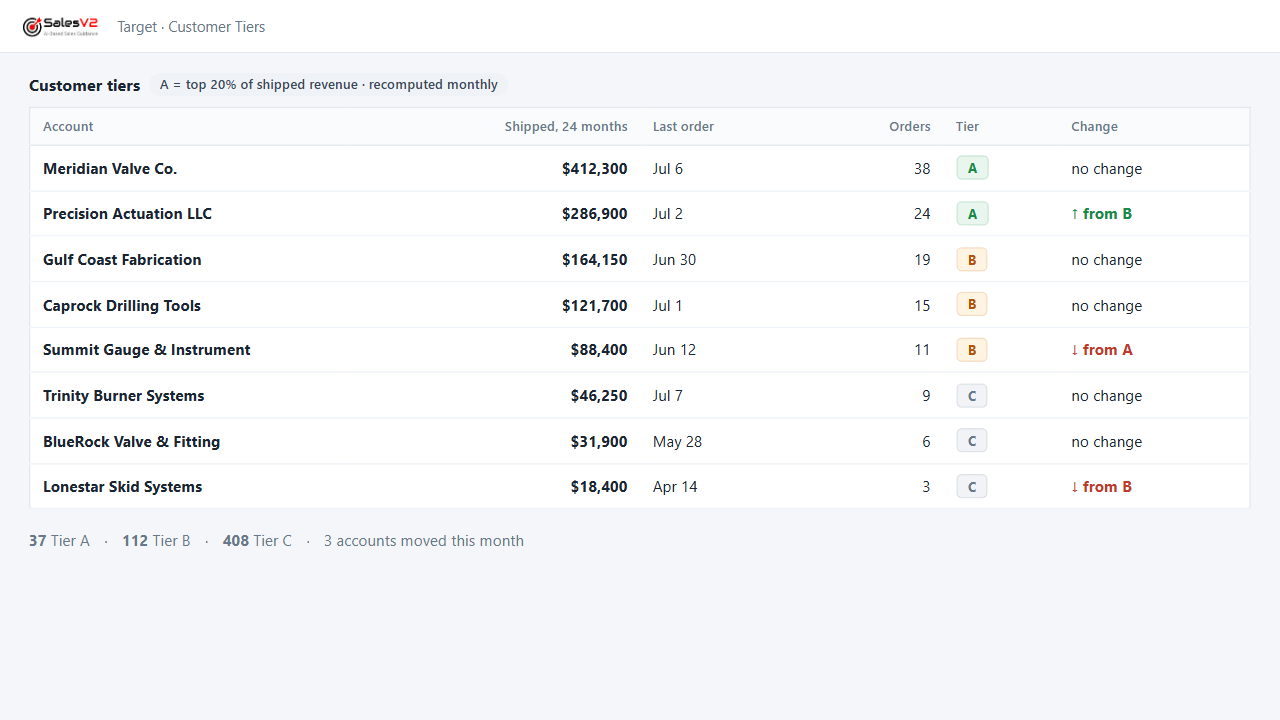
Tiers every account on what it has shipped, so the calls, the visits and the campaigns go to the right names first.
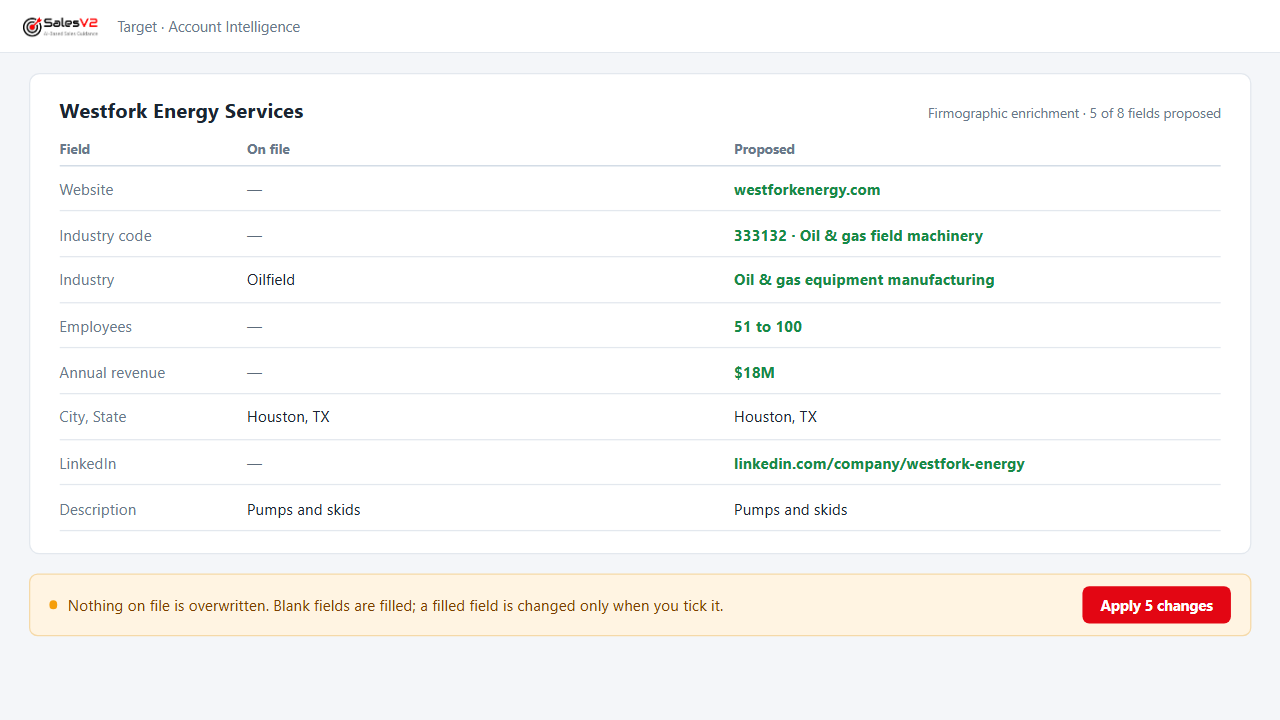
Adds revenue, headcount, industry code, website and LinkedIn to an account from public sources, and shows you what changed before it saves.
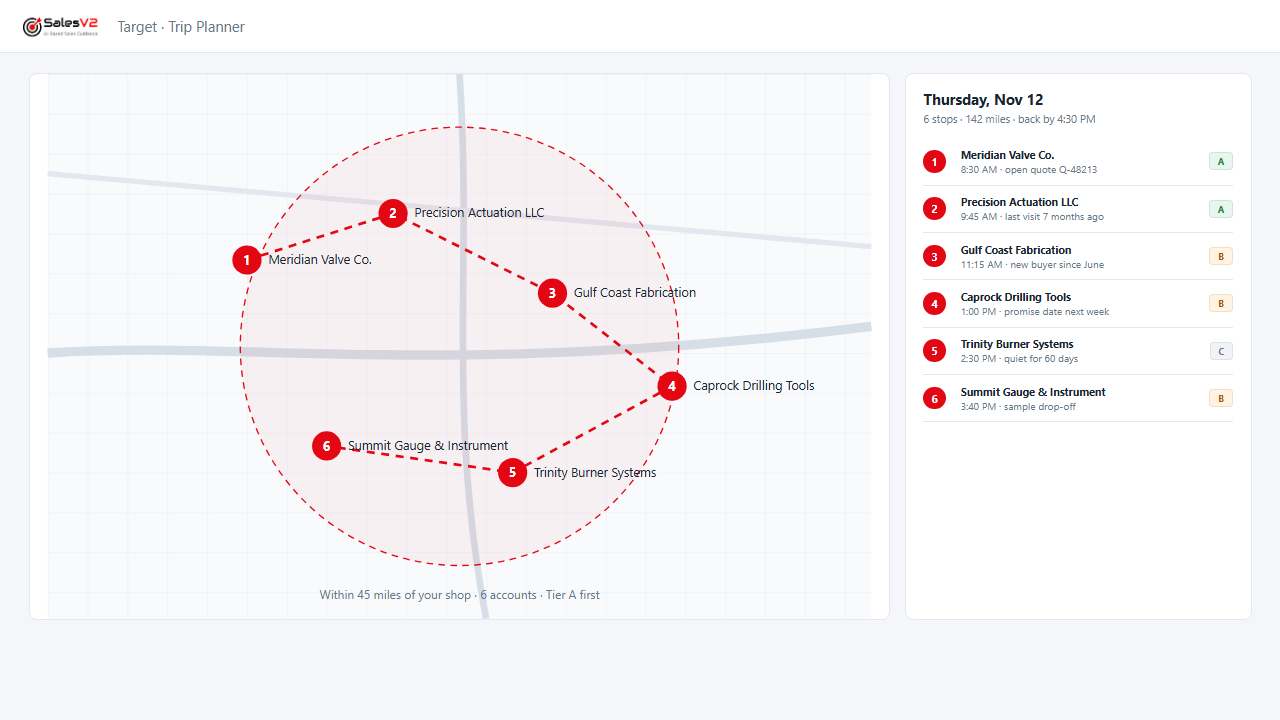
Puts your accounts on a map, picks the ones within reach of a trip and orders the day.
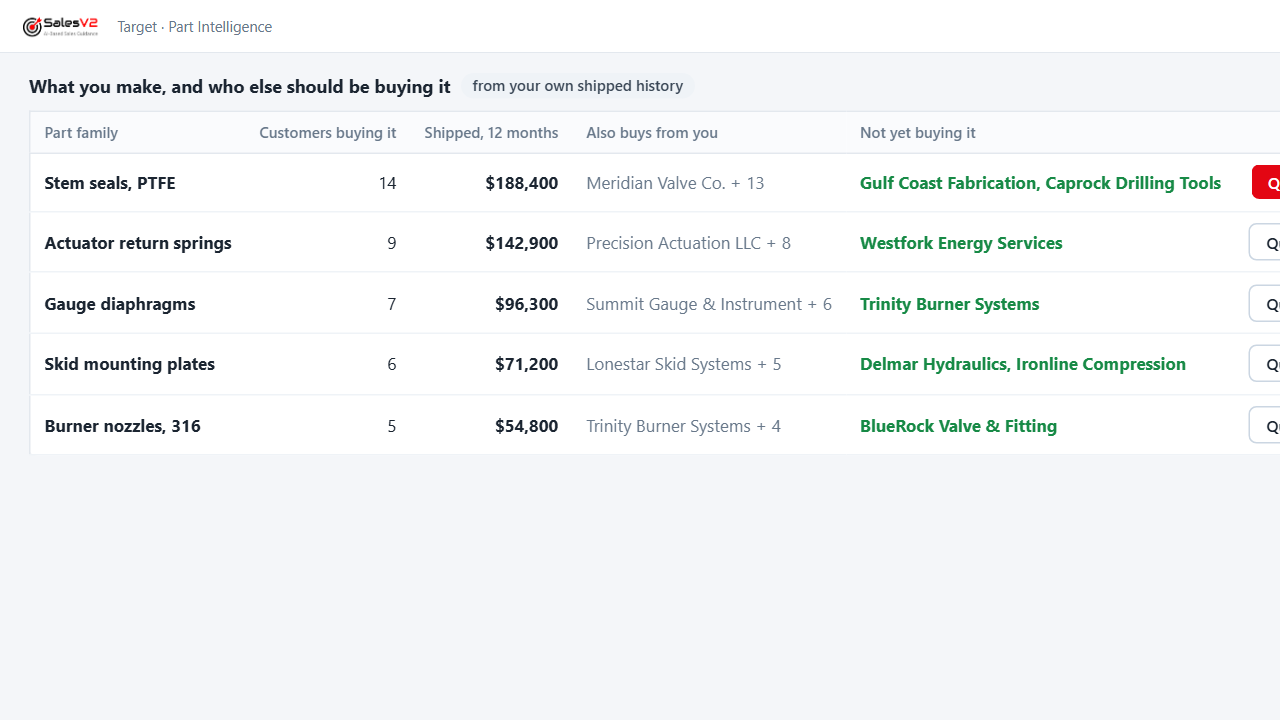
Looks across your order history for the part families each customer buys, so a new inquiry lands with the history beside it.
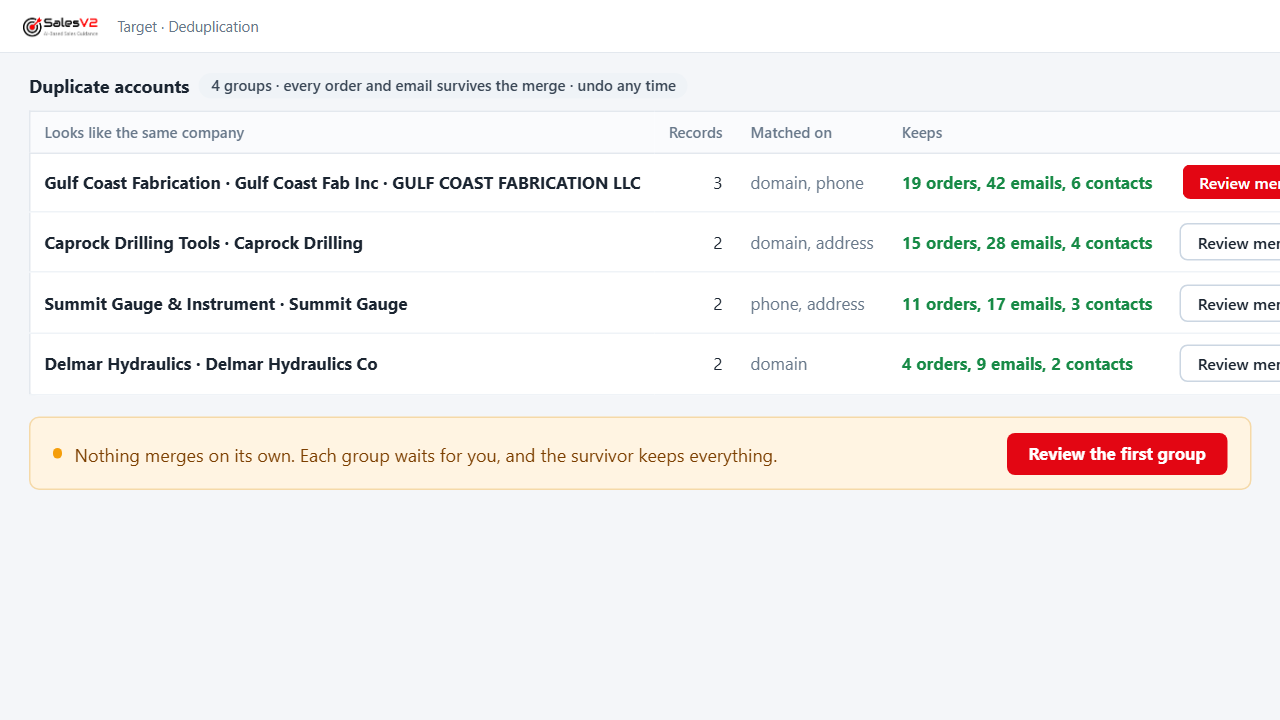
Finds the same company entered three ways, proposes the merge, keeps every order and email, and lets you undo it.
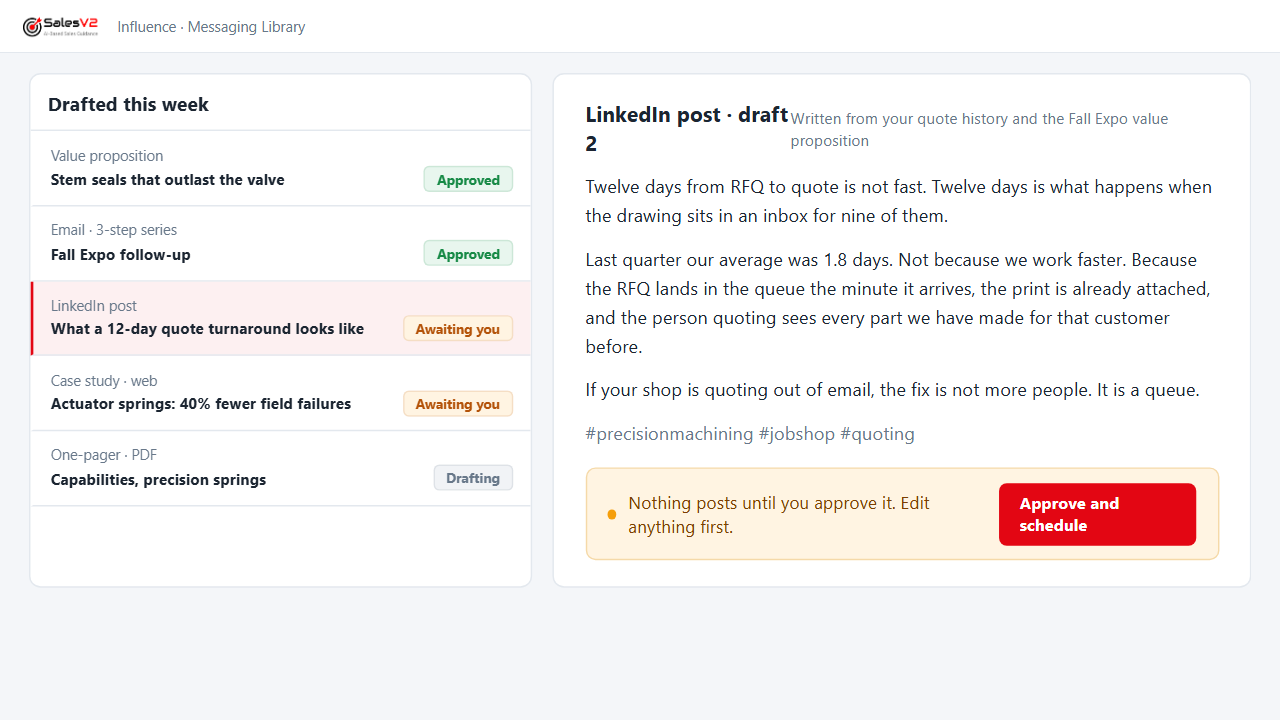
Drafts the value proposition, the email, the social post and the web case study from what you already sell; you edit, you approve.
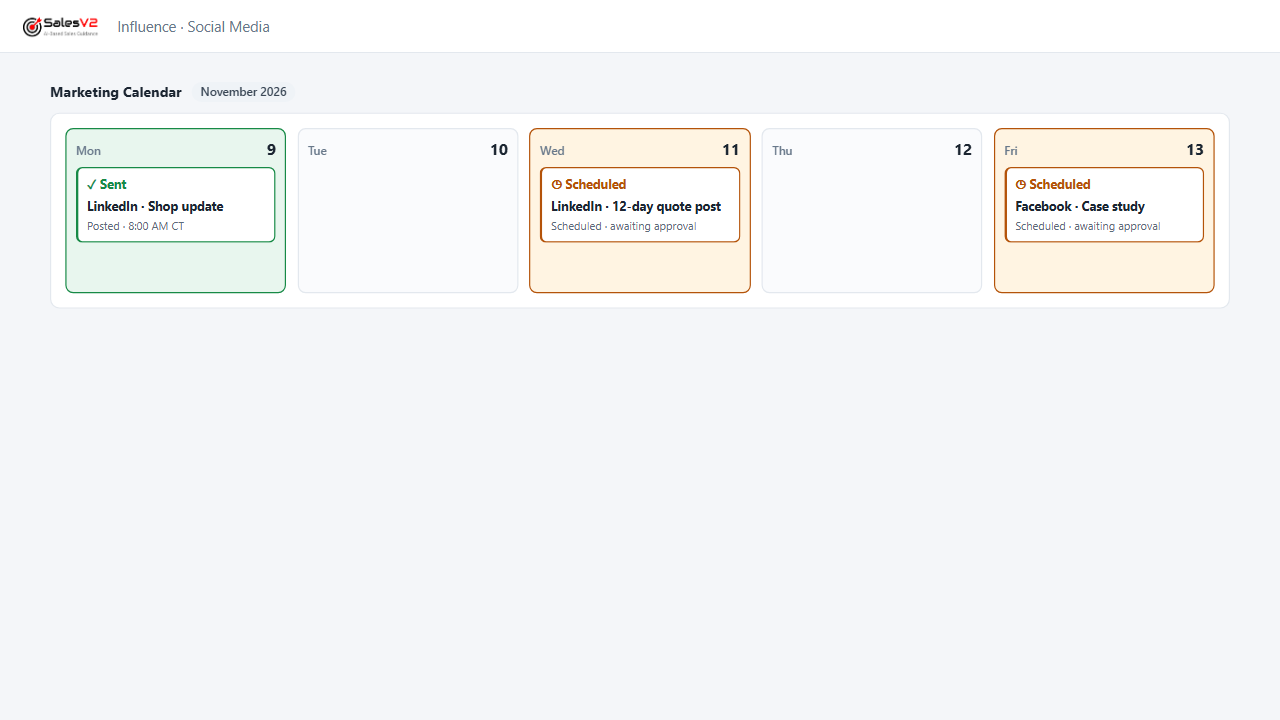
Schedules the posts across your channels from one calendar; every post waits for approval before it goes out.
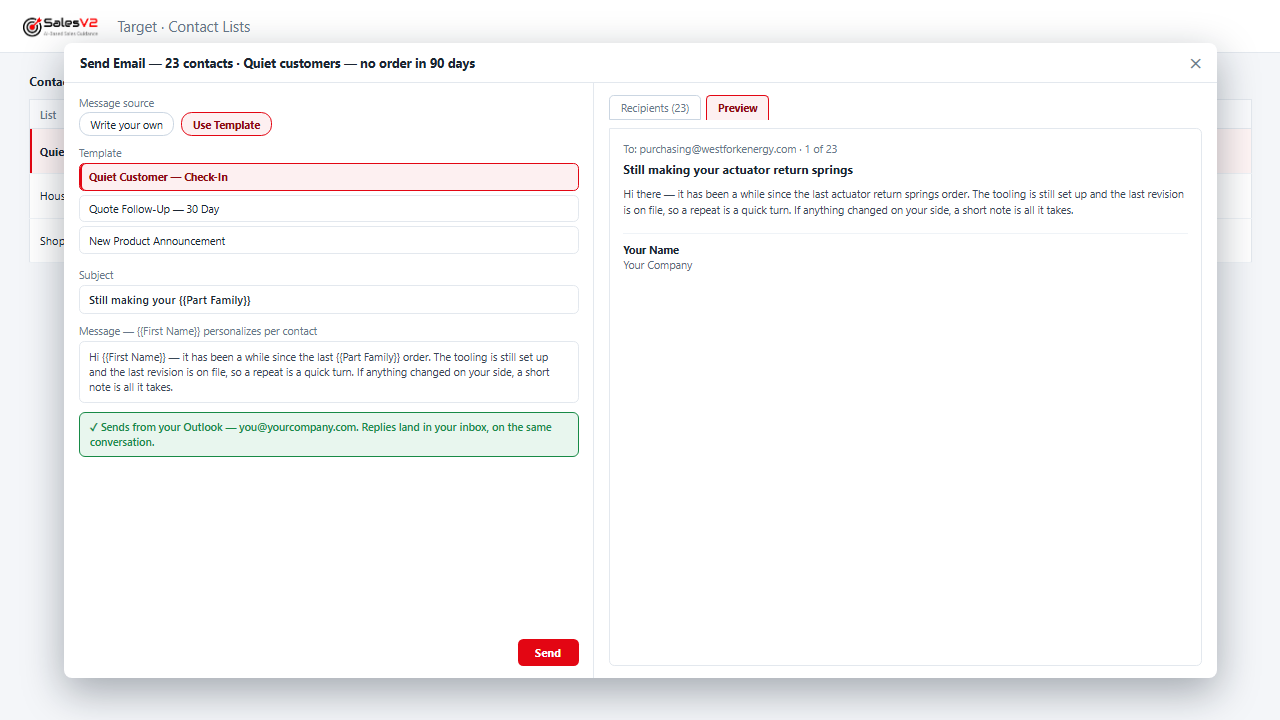
Finds the customers who stopped ordering, drafts the note that fits their history, and parks the campaign for your approval.
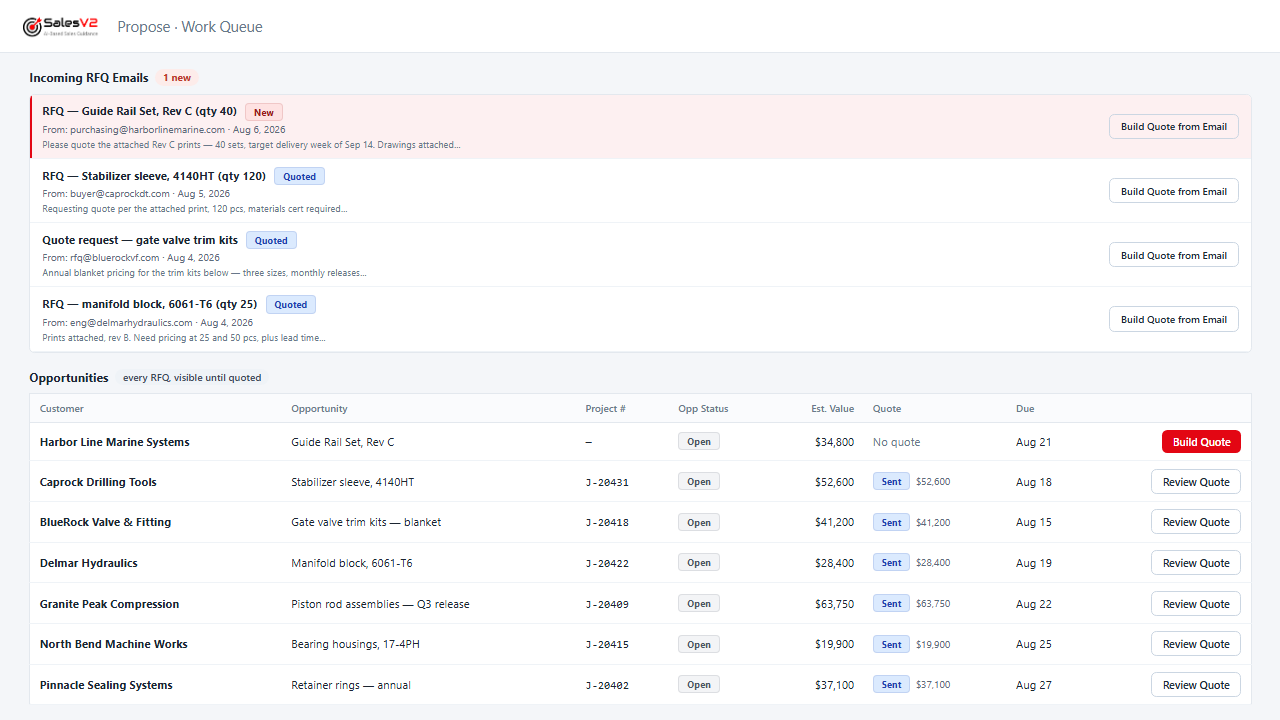
Reads the RFQ email, files it, assigns it and sends the acknowledgement under your rules, before anyone opens the inbox.
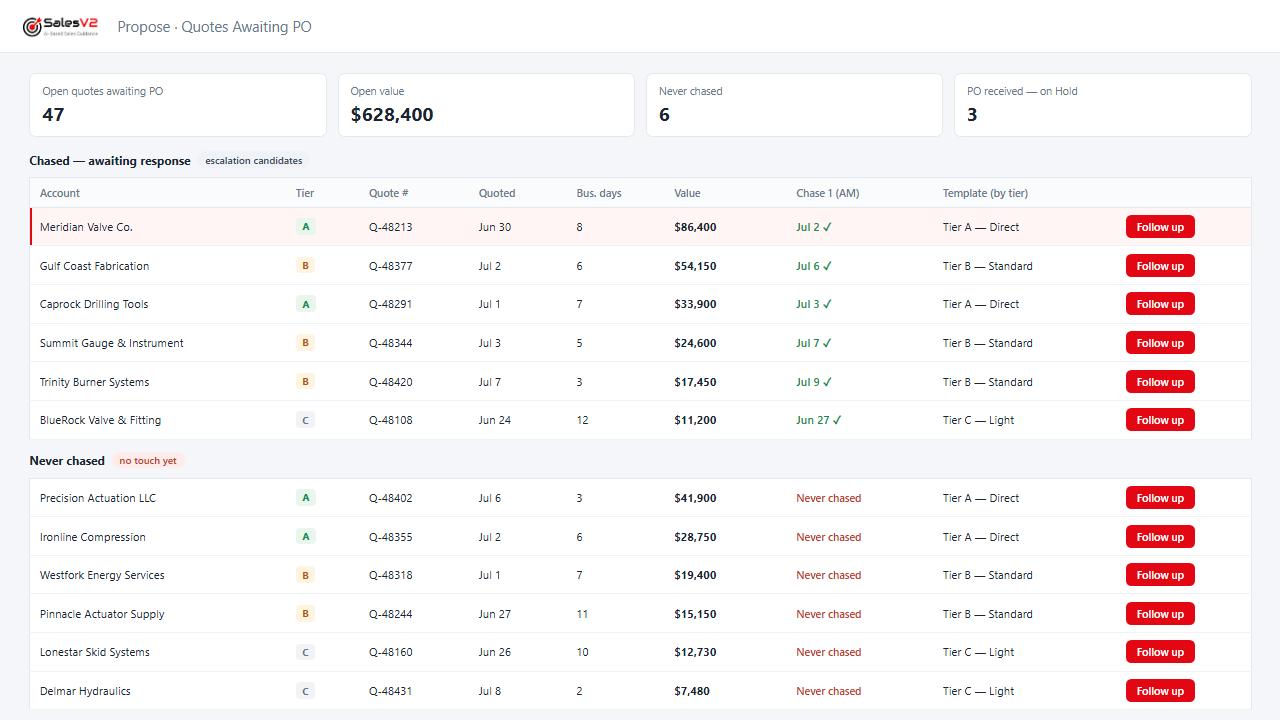
Lists every quote that never came back as a PO, drafts the follow-up, and sends it after you approve.
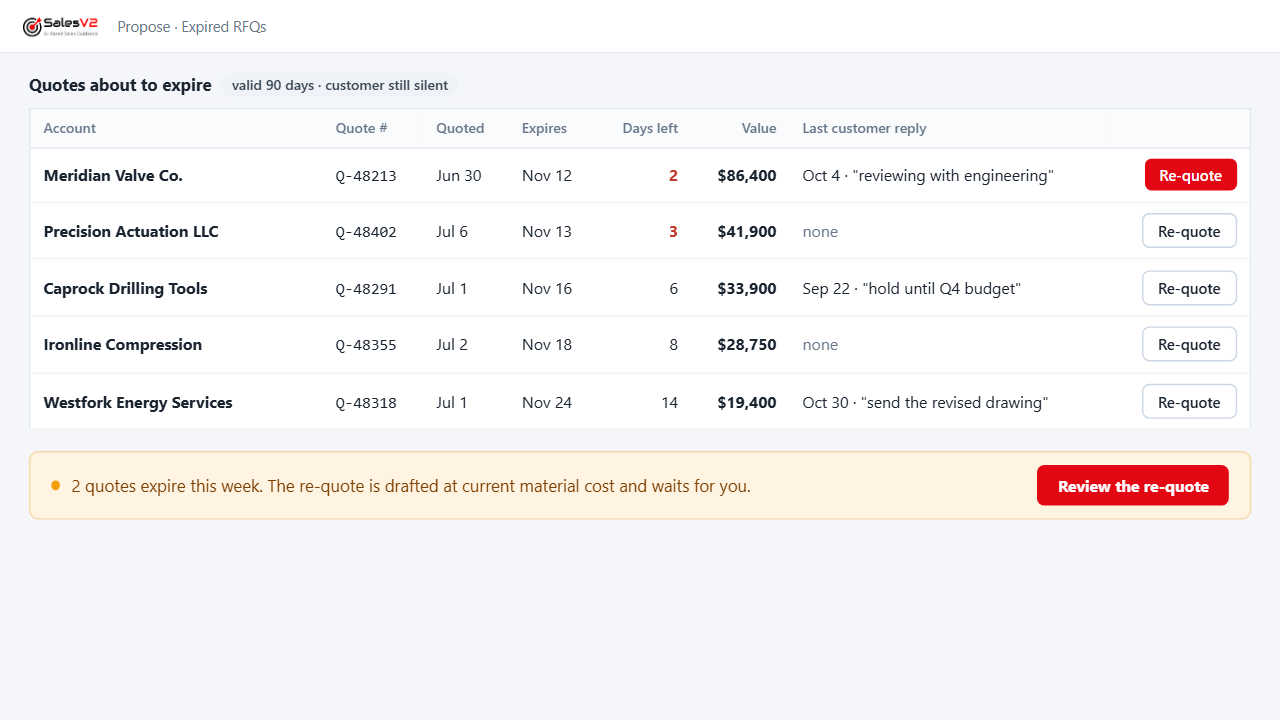
Flags the quotes reaching their expiry date with the customer still silent, so you re-quote before you lose them.
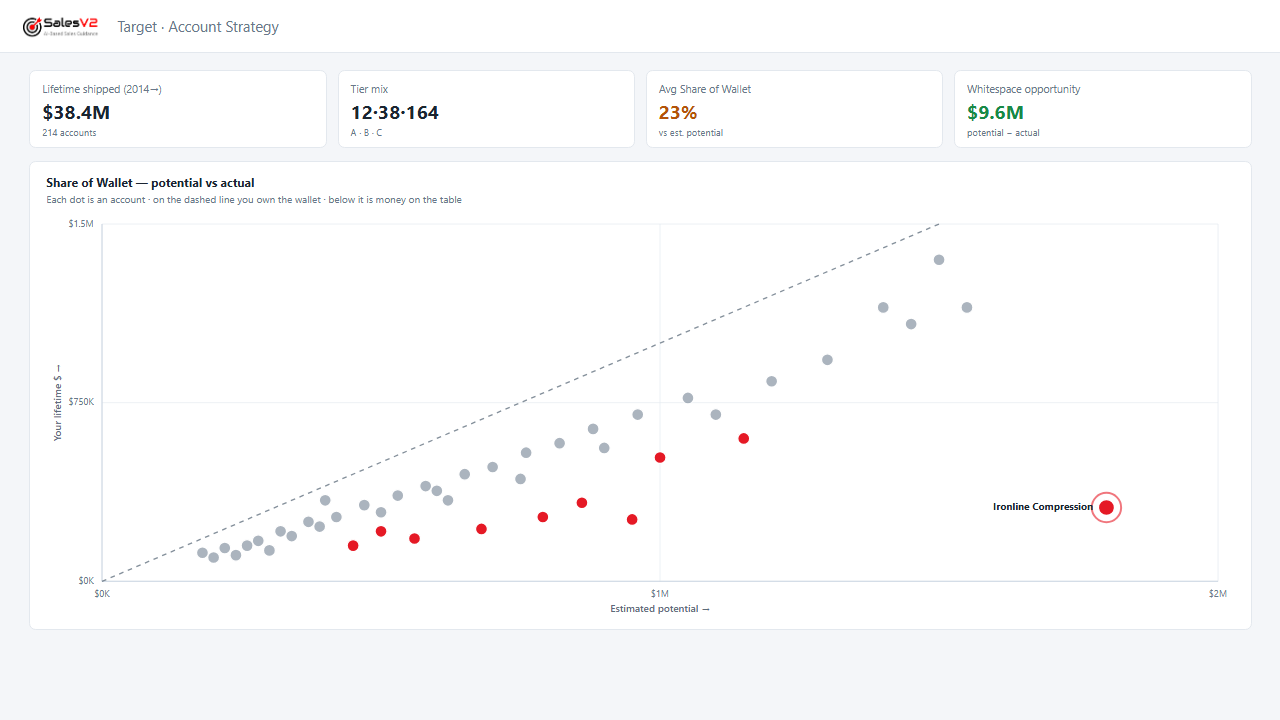
Shows what each customer buys from you and what they buy from someone else that you already make.
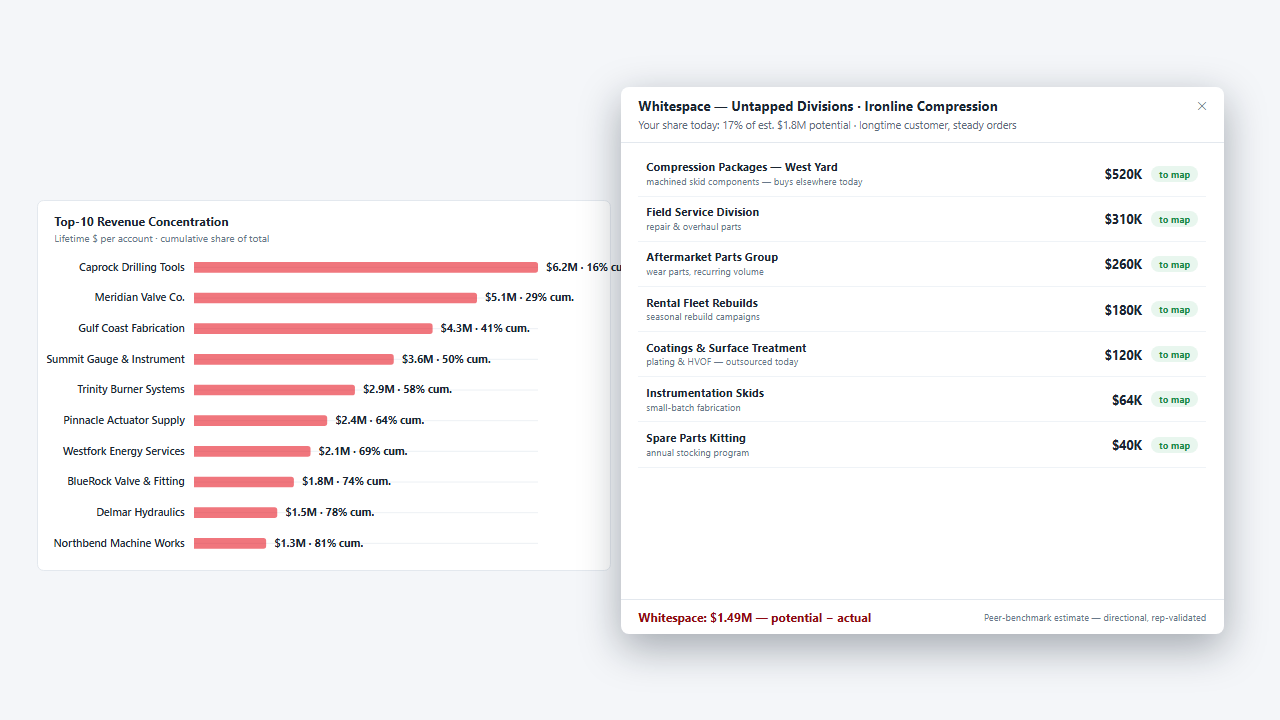
Maps the sister plants and group companies of a customer you already ship to, finds the people, drafts the note and parks the campaign.
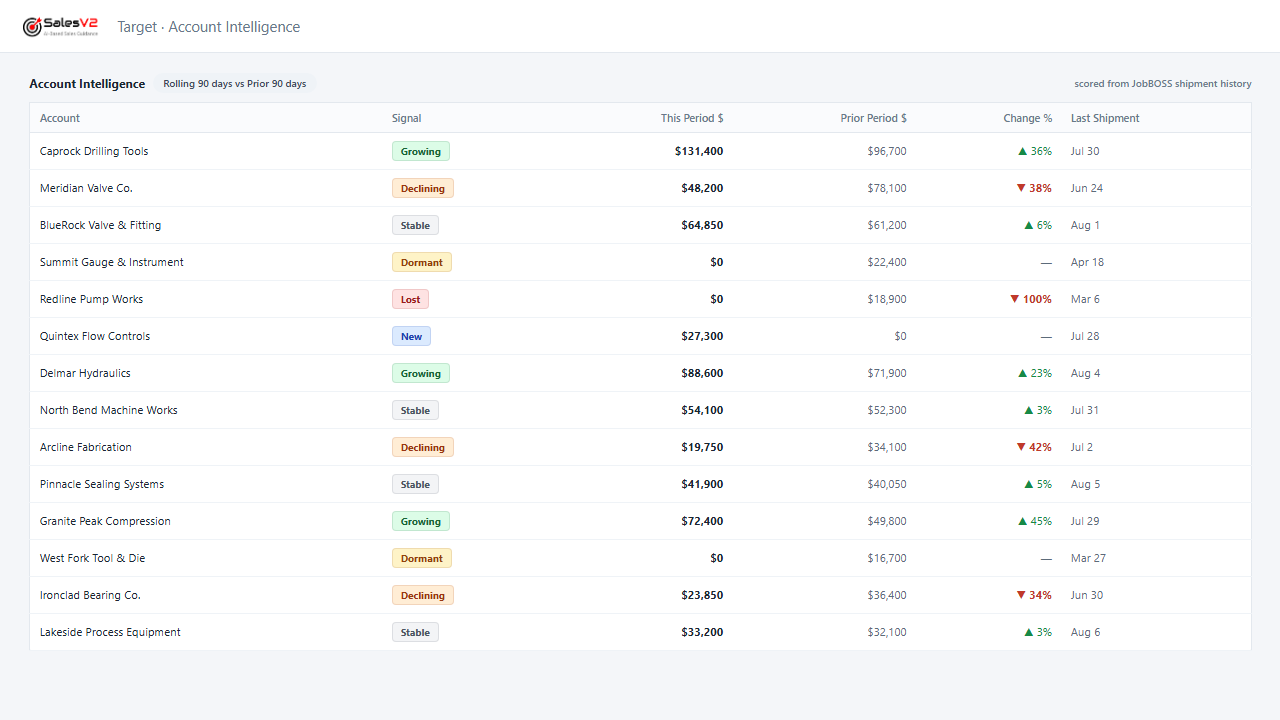
Flags the account whose orders are tapering off while a phone call can still turn it around.
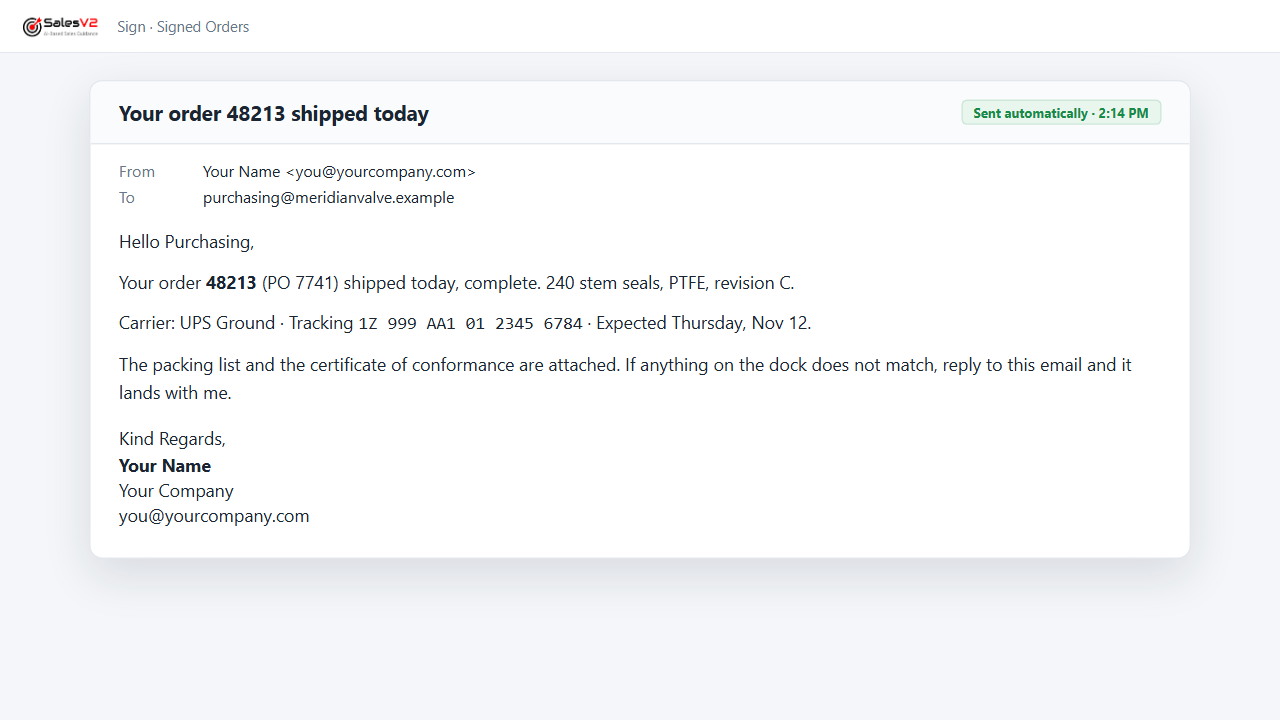
Sends the tracking notice the moment the shipment leaves, signed by the person they know.
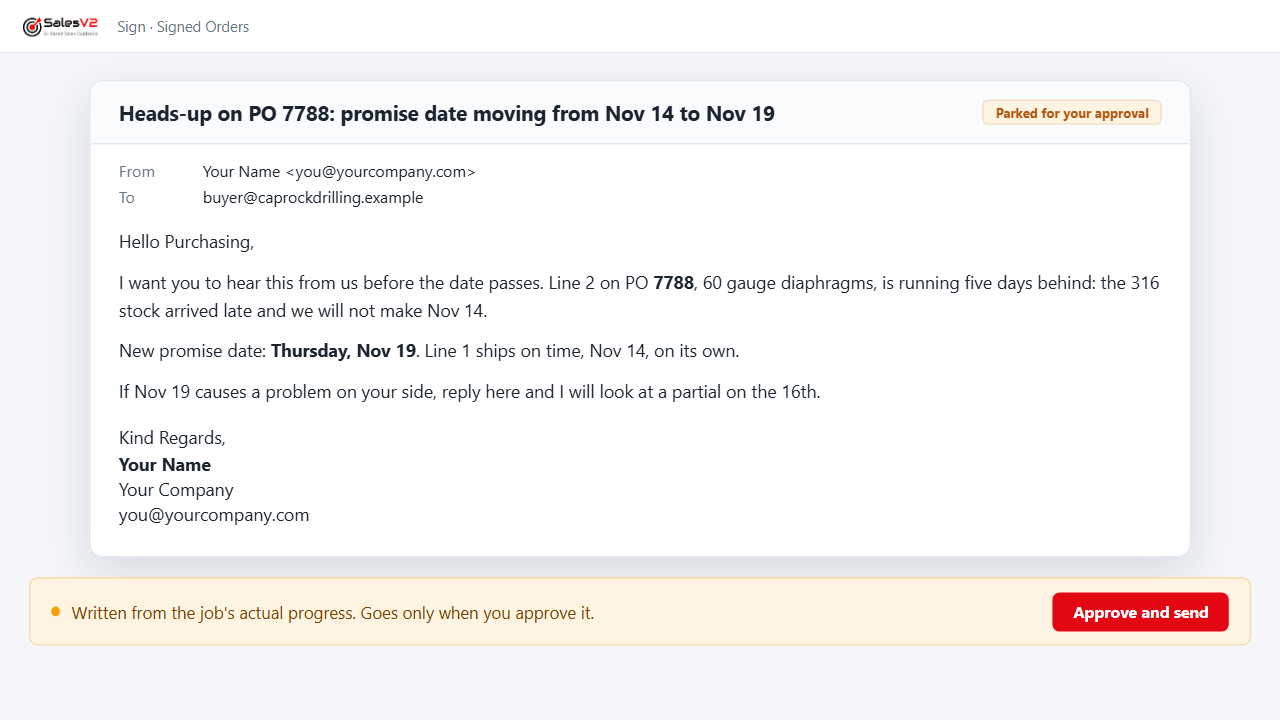
Watches promise dates against the shop’s progress and warns the customer’s buyer before the date passes, not after.
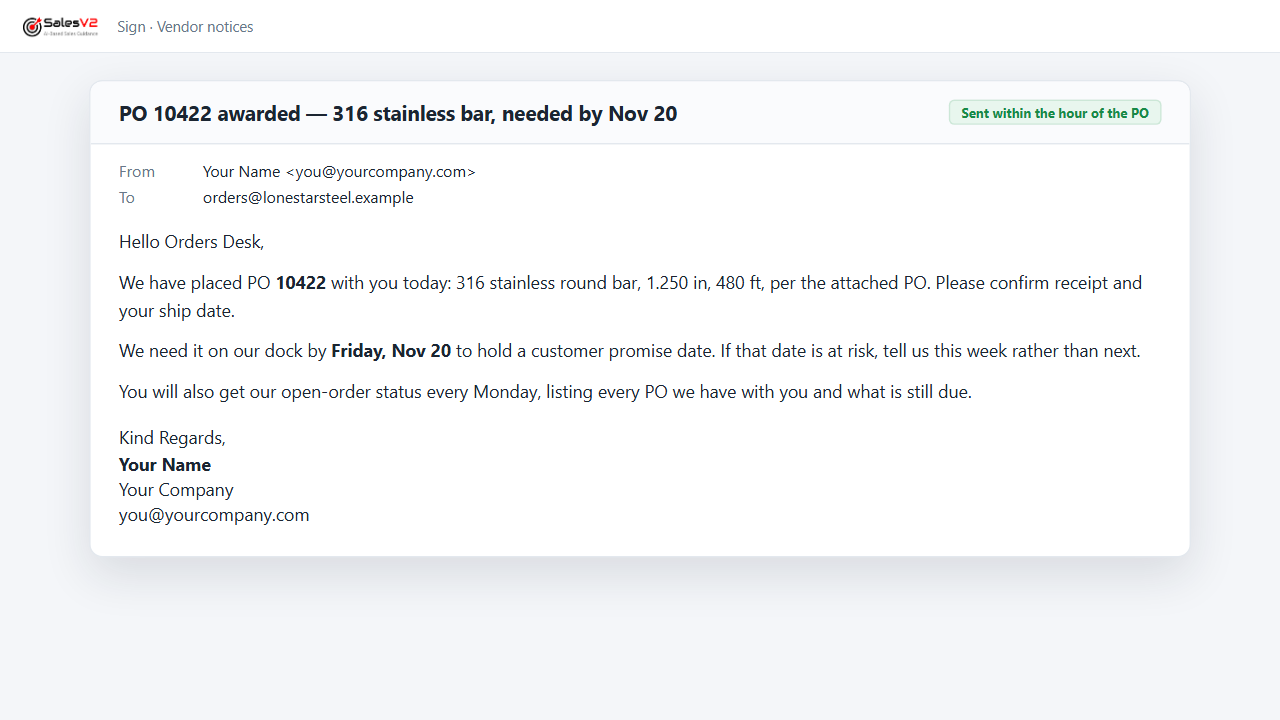
Sends the PO award to the vendor within the hour and the open-order status every week, from your purchasing data.
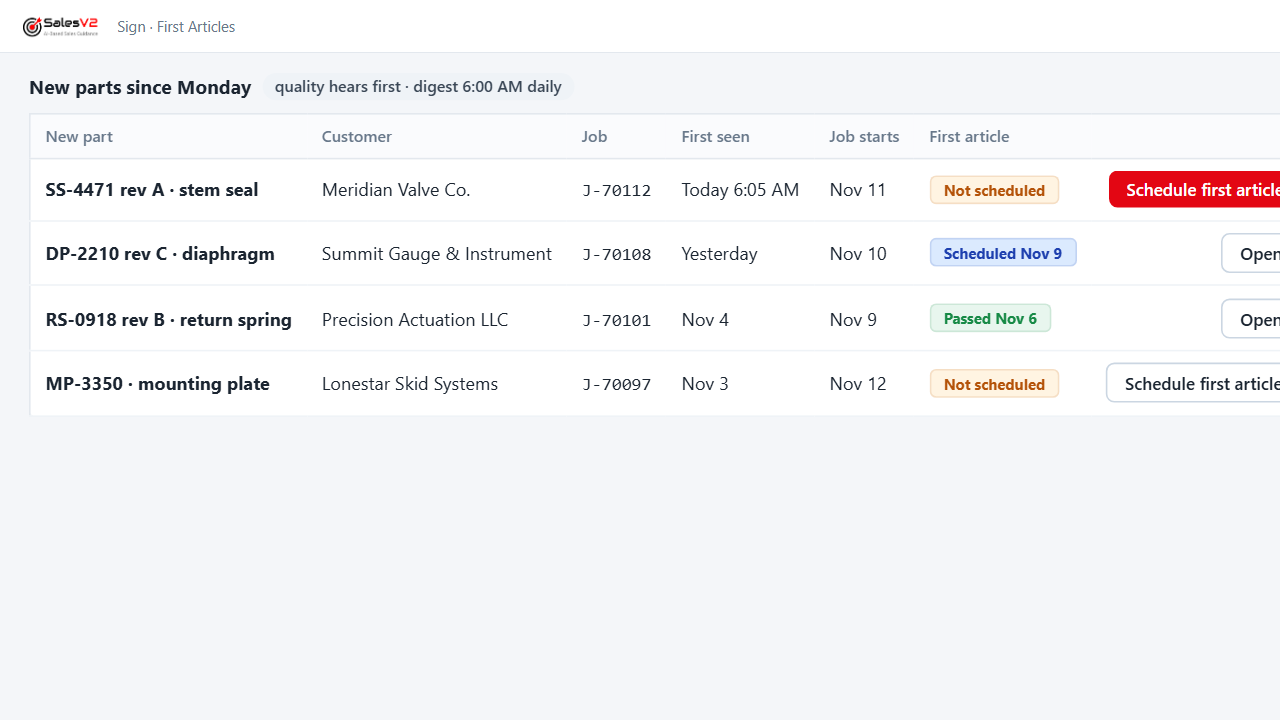
Tells quality about every new part before the job starts and keeps the first-article queue current.
AI agents that stop at your desk. Nothing reaches your customer without you.
Nineteen plays. Every one of them parks its result for your approval before anything is sent. Mock-ups use fictional companies and data.
Two Ways to Run Every Play
Same engines, same approval gate. You choose whose hands are on the controls, play by play.
Leave it to the tool
Tell it who you want. It asks until it knows, shows you the price, does the work, and parks the result on your desk. Nothing reaches your customer until you approve it.
This play will use 25 credits and up to 50 of this month’s prospecting allowance. It creates prospects, a target list and a draft campaign that waits for your approval. OK to continue?
- Find the companies and people50 people with a verified email
- Add them to your CRM as prospects8 new accounts, 50 new contacts
- Build the target list50 people
- Write the noteFrom your pitch, in your words
- Park the campaign for your approvalWaiting for your approval
The play as it runs: the conversation, the price, the five steps. Names and counts are fictional.
Drive it play by play
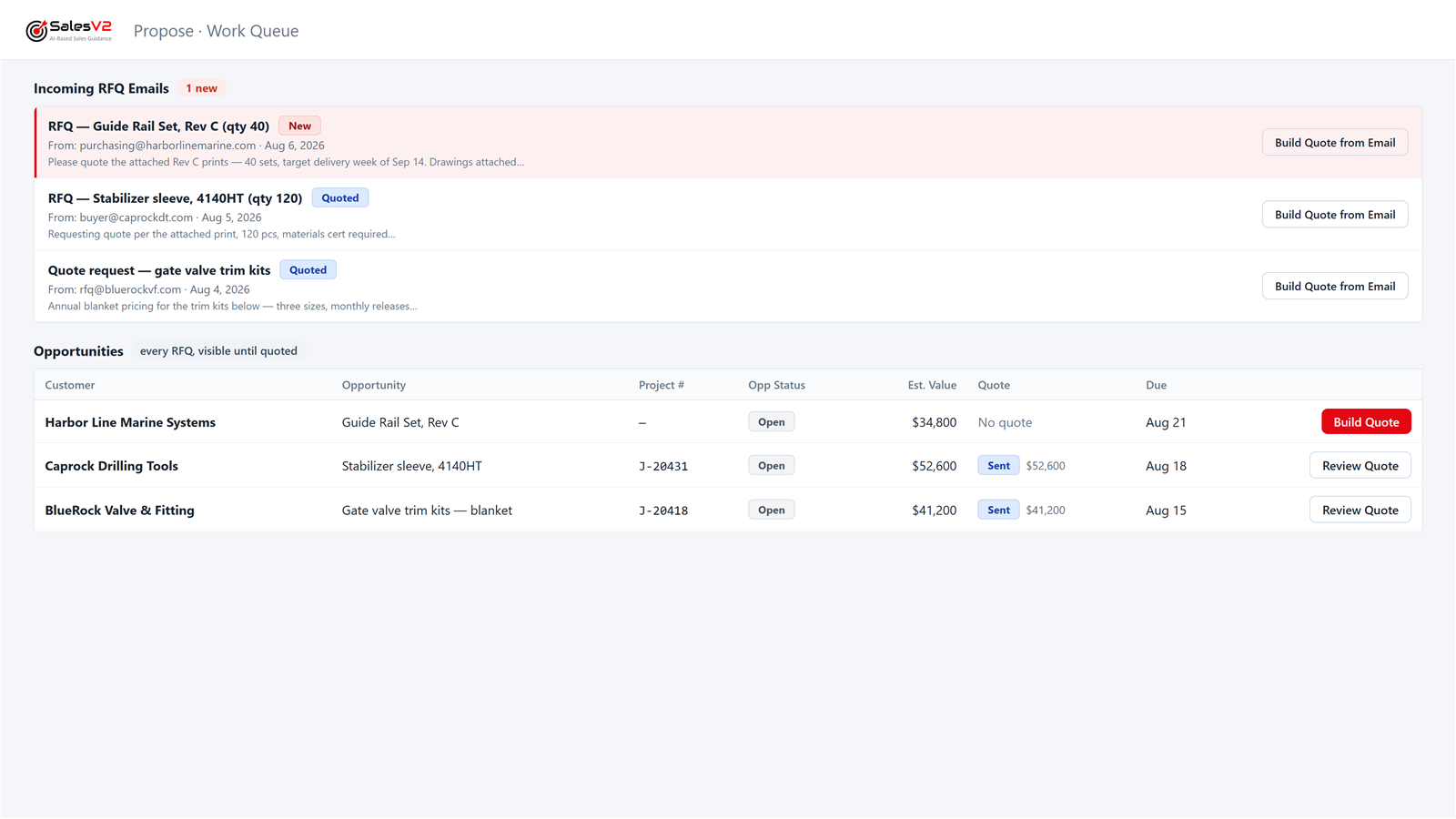
Every play is built from modules you can open yourself: the Work Queue, Strategy, Target Lists, Campaign Hub. One screen, every RFQ, quote and order, with your hands on the controls.
Reports That Deliver Themselves
A report writer has a layout. It has no clock, no condition and no recipient. SalesV2 reads your JobBOSS data and sends the report, by email, to the person who needs it, when they need it.
On a schedule
The same report, to the same people, every time, without anyone opening the ERP.
- The pick list, every working morning at 6:00, to the stockroom and the floor.
- Open orders with each vendor, every Monday, to purchasing and to the vendor.
- New parts since yesterday, before the shift, to quality.
On a condition
Only when the data says so. Silence means nothing needs your attention.
- A promise date the job’s progress says will slip, to the customer’s buyer, before the date passes.
- A quote reaching its expiry with the customer still silent, to the person who quoted it.
- A customer whose orders drop below their own average, to the owner.
On an event in the workflow
The moment something happens in the ERP, the right person hears.
- The PO award to the vendor within the hour of the PO, with what is needed and when.
- The tracking notice to the customer the moment the shipment leaves.
- The first-article flag the moment a new part appears on a job.
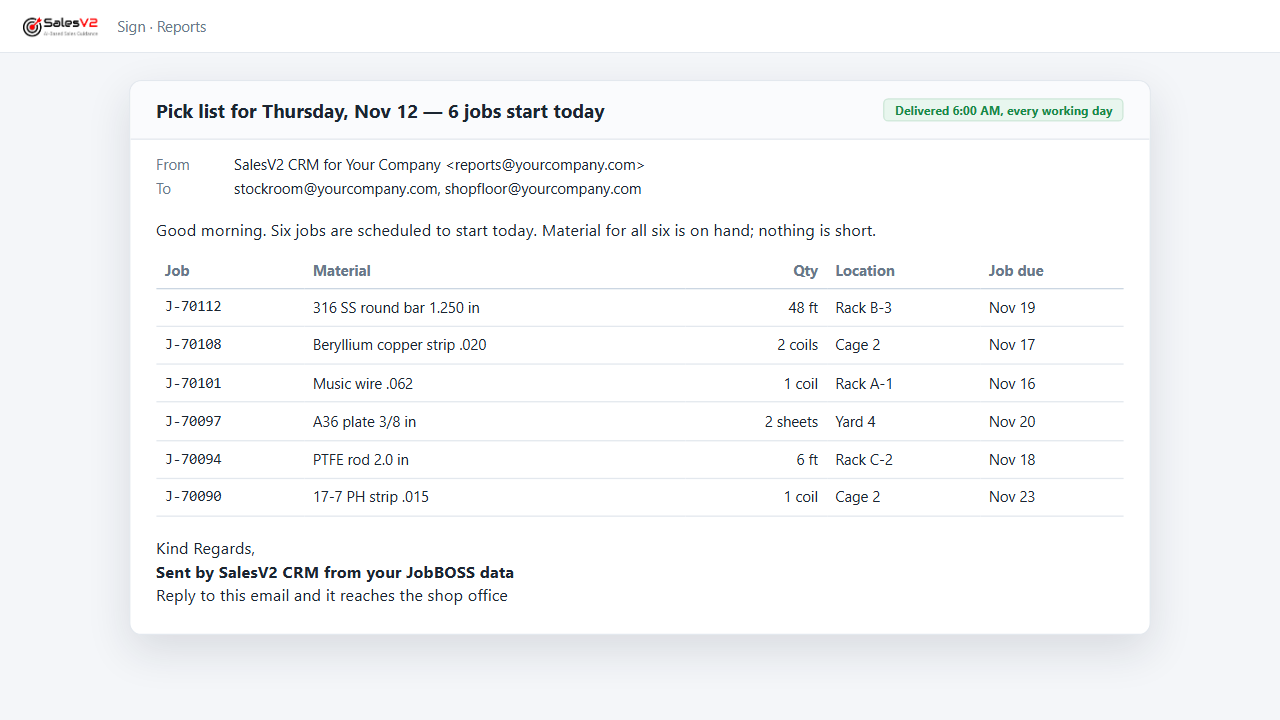
Who hears: the owner, purchasing, quality, the floor, your vendors and your customers. Every play that sends is one of these three, and every send to a customer or a vendor waits at the desk of the person whose name is on it.
Four Plays, Running on Shop Data
Each walkthrough is one play: the AI agent does the sales job from your JobBOSS data and your inbox, and the result stops at your desk.
- Leave it to the tool:
- Lists every quote that never came back as a PO, drafts the follow-up, and sends it after you approve.
- Drive it play by play:
- Propose, then Quotes Awaiting PO.
- Leave it to the tool:
- Flags the account whose orders are tapering off while a phone call can still turn it around.
- Drive it play by play:
- Target, then Account Intelligence.
- Leave it to the tool:
- Shows what each customer buys from you and what they buy from someone else that you already make.
- Drive it play by play:
- Target, then Strategy.
- Leave it to the tool:
- Reads the RFQ email, files it, assigns it and sends the acknowledgement under your rules, before anyone opens the inbox.
- Drive it play by play:
- Propose, then the Work Queue.
Product walkthroughs — all company names and data shown are fictional.
What Runs the Plays
The engines under every play: your JobBOSS data, your emails, and your sales pipeline on one screen. Zero dropped quotes.
Native JobBOSS Sync
Quotes, orders, contacts, and RFQs pulled automatically and always current. No Zapier. No middleware. No manual entry.
Email-to-RFQ Matching
Incoming RFQ emails are automatically parsed and correlated to JobBOSS quotes. Every request hits a shared work queue — no more lost emails.
Quote Follow-Up Dashboard
See which quotes are pending, expired or won, live from JobBOSS. Expired quotes are flagged and the follow-up is drafted for you.
Influence Actions
Proactive outreach tasks tied to your accounts, quotes, and pipeline. Every follow-up, meeting, and campaign moves a deal forward.
Email Automation
Rules that trigger follow-ups automatically. Quote expiring in 3 days? Customer gone quiet? The system sends the right email at the right time.
Email Templates & Mass Email
Pre-built templates with personalization placeholders. Select 50 contacts, pick a template, hit send — every email has their name and company.
Social Media & Content
Post to LinkedIn, Facebook, and more from one dashboard. Pre-built content library with value propositions. Schedule posts, track engagement.
Secure & Isolated
Row-level security, tenant isolation, and SOC 2 readiness. Your data stays yours. Works with Microsoft 365 / Graph API.
Built for Shop Teams
Role-based pricing so you only pay for what each user needs. Viewers get affordable read-only access. No sales-ops team or CRM consultant required.
The Product, at a Glance
Three views your team will live in — the work queue, the customers who are quietly slowing down, and the money still on the table.
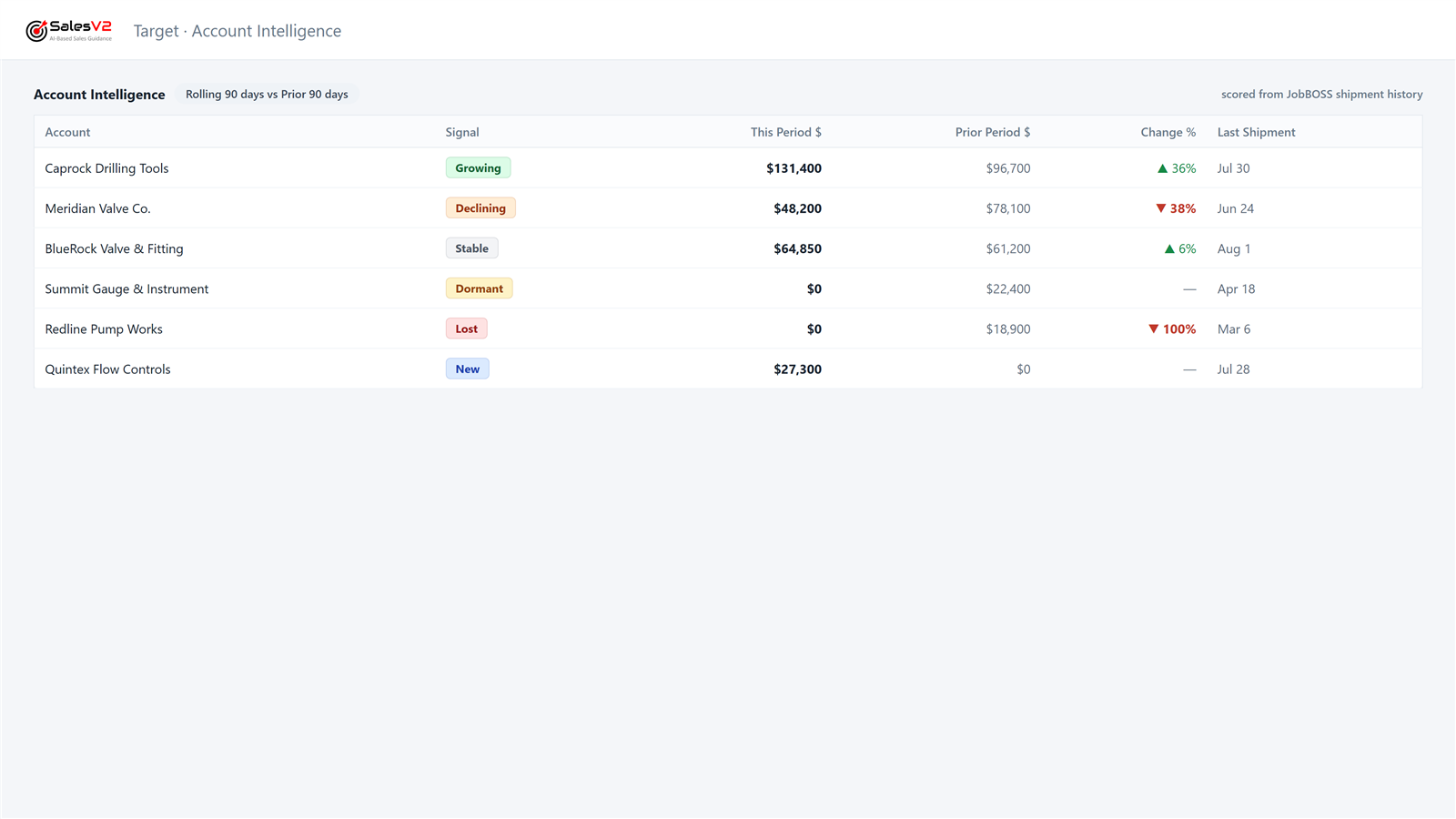
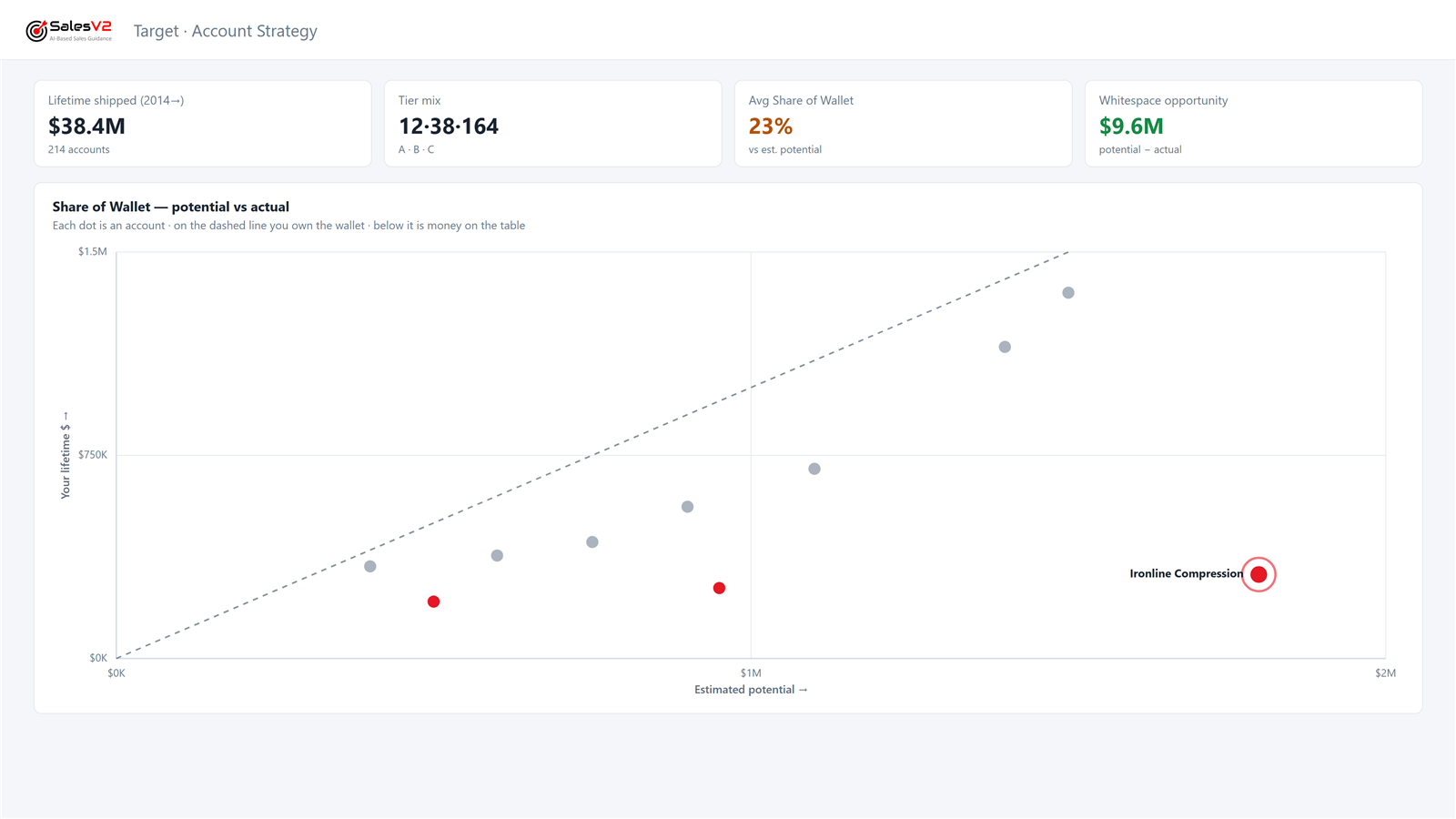
Conceptual product mockups — all company names and data shown are fictional.
SalesV2 vs. Generic CRMs — For JobBOSS Shops
You don't need a CRM that can do everything. You need one that does the things your job shop actually needs.
| Pain Point | Generic CRM(Salesforce, HubSpot, Pipedrive) | SalesV2Built for JobBOSS |
|---|---|---|
| JobBOSS data in CRM | Manual entry / Zapier hacks | Native auto-sync |
| RFQ tracking | Spreadsheets alongside CRM | Auto-captured from Outlook inbox |
| Quote follow-up | "Did we quote that?" guesswork | Real-time status from JobBOSS |
| Email → Quote correlation | Doesn't exist | Auto-matched: RFQ email → JobBOSS quote |
| Expired quote recovery | Nobody notices | Flagged with one-click follow-up |
| Setup time | Months of customization | Live in under a day |
| Price | $75 - $175/user/mo + admin overhead | $75 - $175/user/mo — role-based, no admin overhead |
| Integration Tools | $250 - $500/org/mo | $0 |
"We found 6 expired quotes worth over $150K in the first week. Re-engaged 4 of them and won 2. We went from sticky notes and spreadsheets to knowing the status of every RFQ in seconds."
Quoting Manager
Precision Machining Shop — JobBOSS Customer
An Entire Support Organization — Not Just an App
New AI tools demo well. Manufacturing software is judged in year two — when you need a person to answer. SalesV2 is delivered with COMPRSA, our dedicated development, QA, and support organization.
Dedicated Development
A standing engineering team builds and extends the product continuously — new capabilities ship to every customer, not just the loudest one.
QA on Every Release
Every change is independently tested and verified against live customer workflows before it ships. Your quoting day is never our test environment.
Humans on Support
The in-app support button reaches a person on a dedicated support team — plus standing check-in calls with every customer. Decades of combined enterprise-software experience behind every answer.
Simple Per-User Pricing
Pay only for the users who need it. Role-based pricing means your shop floor and front office aren't paying the same rate.
Annual billing: pay for 10 months, get 12 (2 months free)
Admin
$1750/year with annual billing
Full platform access, billing, settings, user management
Division Admin
$1500/year with annual billing
Manage a division — users, email config, RFQ assignments
Sales Manager
$1200/year with annual billing
Pipeline visibility, reports, team oversight, campaigns
Sales Rep
$750/year with annual billing
Work queue, email, quote tracking, tasks, follow-ups
Example: A Typical Job Shop
7 users = $820/mo
That's ~$117/user average — with full JobBOSS sync, email integration, and work queue included
Optional Add-Ons
Email Automation
$50/moRules that trigger follow-up emails based on quote status, expiry, or inactivity
Social Media Automation
$75/moPost to LinkedIn, Facebook & more from one dashboard with scheduling
AI Token Pack (10K)
$20/moAI-powered email classification, content suggestions, and smart replies
See a live JobBOSS integrated demo.
Live in Under a Day
No 6-month implementation. No consultant required. Here's how it works.
Connect JobBOSS
Connect your JobBOSS system. We start syncing quotes, orders, and contacts immediately.
Authorize Email
Connect your Microsoft 365 account so SalesV2 can match incoming RFQ emails to quotes.
See Your Data
Your dashboard populates with real JobBOSS data — quotes, open RFQs, customer history, and more.
Start Working
Your team uses the work queue to track every RFQ, follow up on quotes, and stop losing work.
Comparing CRMs for JobBOSS?
See SalesV2 side by side with ECI’s JobBOSS CRM module and with Salesforce or Zoho connectors, on what grows sales.
JobBOSS CRM alternatives, comparedFrequently Asked Questions
Does it work with JobBOSS²? What about on-premises JobBOSS?
Both. SalesV2 connects natively to JobBOSS² (cloud) and to on-premises JobBOSS — syncing quotes, orders, contacts, and RFQs automatically. Shops running the on-prem version most CRMs won't touch are exactly who we built this for.
We still call it E2 Shop. Does SalesV2 work with E2?
E2 Shop System is now JobBOSS². If your shop moved to JobBOSS², SalesV2 connects to it through its API and you can be live within a day. Still on an older on-premises E2 install? Ask us; the same connection approach applies.
How long does setup take?
Most shops are live within a day. Connect your JobBOSS system, authorize your Microsoft 365 email, and your data starts flowing immediately.
Is my data secure?
Absolutely. We use row-level security and full tenant isolation. We are on the SOC 2 compliance path and your data is never shared across accounts.
What if I don't use Outlook?
SalesV2 works with Microsoft 365 email (Outlook, Outlook on the web) via the Microsoft Graph API — the setup most JobBOSS shops already run. Google Workspace support is on the roadmap; if that's you, tell us and we'll factor it into your timeline.
How do I get started?
Book a demo — we'll show you a live JobBOSS integrated demo. Pick a plan when you're ready — all your data and configuration carry over.
Can occasional viewers (shop floor, estimators) access it?
Yes. We offer a low-cost Viewer role specifically for estimators, shop floor leads, and anyone who needs read-only visibility without the full sales toolset.
Who actually supports SalesV2?
A dedicated development, QA, and support organization — COMPRSA (comprsa.com), our family-run engineering and support company. The in-app support button reaches a person, releases are independently QA'd before they ship, and every customer gets standing check-in calls. This is manufacturing software with an organization behind it, not an app with a chatbot.
Do I need a CRM consultant to set it up?
No. SalesV2 is pre-configured for job shops running JobBOSS. There's nothing to customize — connect your system, authorize your email, and start working.
What about quotes that already expired?
SalesV2 reads your full quote history. On day one you see every quote that expired without an answer, and most shops find a list worth chasing straight away.
Stop Losing RFQs. Start Winning More Work.
Book a live demo to see how your specific workflow can be handled by SalesV2.
Handle RFQ requests, Quotes, Orders, Marketing and other functions in one system.
Once you see this in action, you'll wonder how you ran without it.
See a live JobBOSS integrated demo.